TechCrunch

August 29, 2016

MY 6TH BUILD | R.O.G Pure Gaming PC


This rig was requested by a friend who needed a pure gaming PC, but time to time he will use it for 3D modeling and video editing projects. That’s why I have chosen the X99 chipset with the latest Broadwell LGA 2011-V3 CPU. GTX 1080 would be the best and beast of the GPU to pair with this gorgeous curved display at 100Hz refresh rate. A set of gaming keyboard and mouse can sure score some head-shots without a doubt.


PC Specification:
Intel Core i7-6800k 3.4 ghz 6 core processor(BX80671I76800K)
Corsair H115i Liquid cooling 104.7 CFM Liquid
Asus ROG Strix X99 Gaming Motherboard ATX LGA 2011-3

G.Skill Ripjaws V Series 32GB (4 x 8GB) DDR4-3200 Memory

Samsung 950 PRO 512GB M.2-2280 Solid State Drive

Seagate Constellation ES.3 1TB 3.5" 7200RPM Internal Hard Drive

Gigabyte GeForce GTX 1080 8GB G1 Gaming Video Card

Phanteks Enthoo Evolve ATX Glass ATX Mid Tower Case

SeaSonic PRIME 750W 80+ Titanium Certified Fully-Modular ATX Power Supply

Corsair K70 RGB RAPIDFIRE Wired Gaming Keyboard

Logitech G900 CHAOS SPECTRUM Wireless Optical Mouse

May 12, 2016

$ 1400 Gaming PC


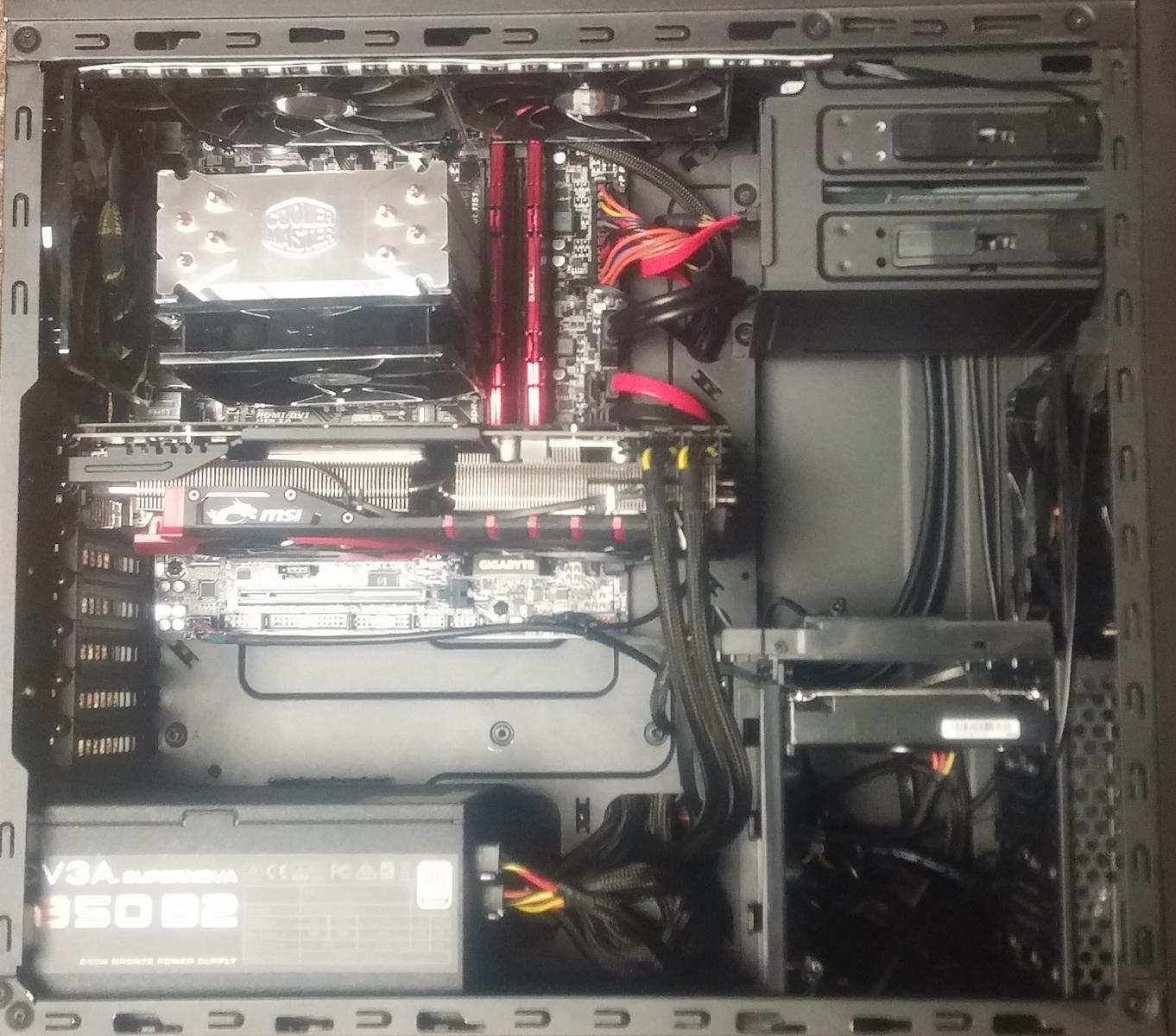
This machine ,was just a fun little project for the weekend for a client who requested for one to be assembled within 3 hours of which I did it since I've been itching to build one for a while. This thing can run pretty much any game you throw at it at around 60 FPS. I plan to make some changes to it in the future such as better speakers, more RAM, possibly another monitor or two along with another GPU and maybe switch over to liquid cooling as per the client requested but that will come when he gets the money. Haven't had any issues with it yet and have never had major issues while assembling so I assume I did everything right (built this unaided). One minor mistake I did make was using a micro ATX Mobo in an ATX mid tower but this didn't present any issues so I stuck with it. Any comments are welcome!


The Specification Include:
 Intel core i5-6600K 3.5Ghz Quad core
G.Skill Ripjaws V Series 16GB(2X8GB) DDR4-2400
Samsung 850 Evo Series 250GB 2.5" SSD
MSI Radeon R9-380 8GB
Corsair ATX Mid Tower
EVGA 850Watts
Asusb DRW-24B1ST/DVD/CD Writer
Gigabyte GA-B150M-D3H Micro ATX LGA 1151
Seagate Barracuda 2TB 3.5" 7200RPM
Micorsoft Windows 10 Home OEM(64Bit)

The Bright Light

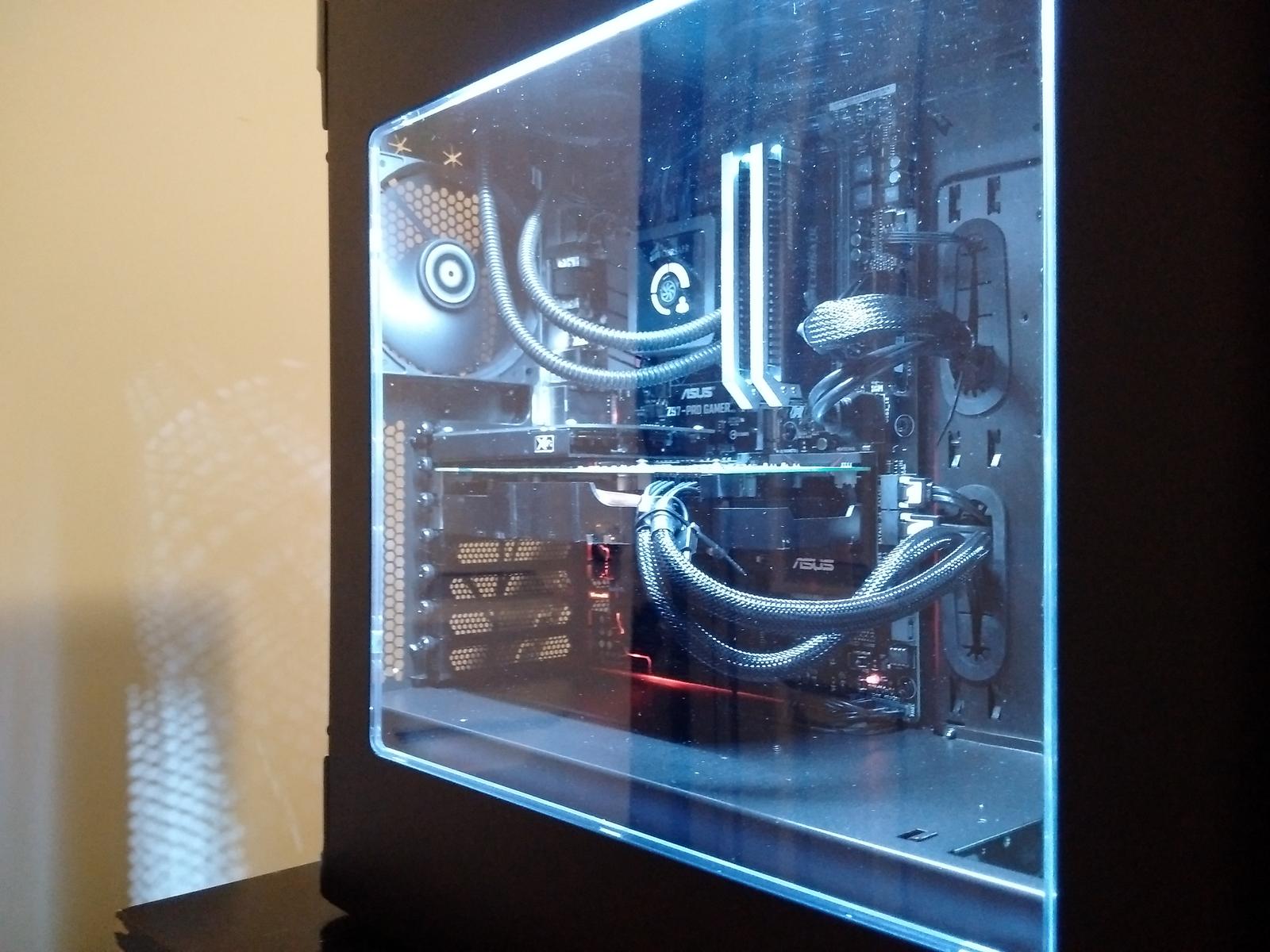
First of all, I bought the Bitfenix Pandora ATX Core, NCIX had it on sale and it came with a LED light strip, and a blue 6-pin gpu extender. This case is nice but, it has some minor issues.
(1) If you want to mount 3 mechanical hard drives in the bottom, make sure your power supply is standard length. The one I bought is bit longer, which made it impossible to turn the thumb screw to tighten the drive cage to the case. So I end up installing 2 drives in the bottom. (2) I reused my Corsair H100 from my previous computer, you have to install the radiator first, before installing the motherboard. (3) The rubber grommets come out of place very easily, but are easy to put back in place.


For decent sound you must connect your front panel to the motherboard. I didn't do that at first, I plugged my headphones to the rear panel and it sounded like ****. It couldn't even power my Sony headphones. Then I watched a Teksyndicate video where the guy from Asus was talking about the Supreme FX chipset. He said Sonic Studio and Sonic something else only works with motherboard header.


The owner mainly uses this computer to run PLEX server, and he occasionally plays Cities Skyline. He also does some light video editing. He currently requested a HD6870 as the GPU, but at the end of the month he's awaiting for  GTX-970 which i will show him how replace it. Other than the few minor issues with the case everything else works fine. 

specification include
Intel core i5-4690k 3.5ghz Quad Core
Asus Z97 Pro Gamer ATX LGA1150
Corsair Dominator Platinum 16GB(2X8GB)

Sapphire AMD Radeon HD 6870 GPU
Samsung 850EVO Series 250GB 2.5" SSD
Bitfenix Pandora ATX Mid Tower
EVGA 750Watts ATX12V/EPS12V

February 17, 2016

My 5TH BUILD | Velociraptor Extreme (nicknamed City night Light)

This computer is used for everyday browsing by the owner who made it possible for me to assemble it for him, as well as 1080p gaming. Hope you enjoy.

CPU: 4690k that I got brand new from eBay for a great price is overclocked to 4.4ghz at 1.178 volts. I could push it higher, but I need about a .05 volt just to get to 4.5, so I don't think it's really worth it.


CPU Cooler: The Cryorig H7 is a great budget cooler. It is very quiet and inaudible at idle. It looks amazing and cools better than the Hyper 212. Bought from Newegg.

Motherboard: I also got my motherboard from eBay, because it was a great price at the time. It still works great, and has all the features I need. It looks decent, and has a debug LED, which can be extremely useful.

Memory: For ram I went with G.Skill Sniper 1866 and it works great. The reason for the different prices in my parts list is because I bought the first kit about a year ago, and the second kit I bought a few weeks ago, not because I needed more ram, but rather, because it was so cheap.

Video Card: I bought my EVGA GTX 770 4gb from ebay for a fantastic price. I went with 4gb, because my last 2gb card was starting to run out of vram in games like GTA V, so 4gb is just for future proofing. Anyway, this is still a pretty good GPU that can still max out most games at 1080p.

Storage: My primary drive for system is my 120gb Samsung 840 Evo that I got for $40(Kshs.4000). My games are installed on my 320gb Western Digital, and my media files are on the 2tb Seagate Barracuda.

Case: I went with the Define S because I liked how it looked and the features it offered, and even though I have an air cooled pc, it is good to know that I can build a custom loop in it without issue.
PSU: The XFX Pro650 XXX Edition is a tier 1 Seasonic rebrand. It is semi modular and has always worked amazingly well.The only thing I don't like about it is that the extra cables are flat, which makes them very hard to manage in this case.

Fans: The be quiet! Pure Wings 2 are great 140mm fans which are awesome for the price you can get them. They are dead silent and are hardly louder when you ramp them up. I have 3 of them as intake, and the two stock Fractal Design fans are in the back and top as exhaust. I keep all my fans at low settings, and all of them are installed with either rubber padding or rubber anti vibration screw mounts.


LED Lighting: I wanted to do a custom approach to LED lighting for maximum customization. I bought an Arduino Gemma controller board and some RGB LEDs from eBay. I also bought a right angle USB chord so I can plug it in straight on my motherboard, because the Z87 extreme4 has an onboard USB port by the ram slots. I have it set up with power from a sata cable by removing the sata ending and wiring the appropriate wires. Then, I used a fan extension cable so I can always unplug it when I plug in the USB chord to go into program mode on the Arduino. By going with the custom approach, I can do ANYTHING with the LEDs, by simply programming it in the Arduino software. This is basically superior to any NZXT Hue or similar system, for only like $20(Kshs.19,500). Totally worth it. I can get any led to show any color on the RGB spectrum by inputting custom values. Also, I can make different effects, such as rainbow, single color, double color, etc. I can choose how many LEDs I use and can set how quick I want colors to change.

PC SPECIFICATION:

    CPU
    Intel Core i5-4690K 3.5GHz Quad-Core

    CPU Cooler
    CRYORIG H7 49.0 CFM

 
    Motherboard
    ASRock Z87 Extreme4 ATX LGA1150

    Memory
    G.Skill Sniper Series 8GB (2 x 4GB) DDR3-1866

    Memory
    G.Skill Sniper Series 8GB (2 x 4GB) DDR3-1866

    Storage
    Samsung 840 EVO 120GB 2.5" SSD

    Storage
    Western Digital Caviar Blue 320GB 3.5" 7200RPM

    Storage
    Seagate Barracuda 2TB 3.5" 7200RPM

    Video Card
    EVGA GeForce GTX 770 4GB Dual FTW ACX

    Case
    Fractal Design Define S w/Window ATX Mid Tower

    Power Supply
    XFX 650W ATX12V / EPS12V

    Operating System
    Microsoft Windows 10 Pro OEM (64-bit)

    Case Fan
    be quiet! 3 Pure Wings 2 61.2 CFM 140mm

    Case Fan
    $11.90
    be quiet! Pure Wings 2 61.2 CFM 140mm

    Case Fan
    $11.90
    be quiet! Pure Wings 2 61.2 CFM 140mm

    Case Fan
    2 Fractal Design GP14-WT 68.4 CFM 140mm fans


    Custom
Roccat Lua

    Custom
IBM Model M2

   Custom
Creative Labs A250

  Custom
Arduino Gemma

    Custom
    LED Strip


MY 4TH BUILD | nicknamed (Pandora)

It's simple and quiet and hits a nice 3.5GHz OC.

The 16 GB of RAM is a bit excessive but necessary for games running a lot of mods and helps with rendering speeds on photo and video work I do freelance from time-to-time.

While I'm not a huge fan of the Pandora case, its selection arose from my desire to have the client's PC look fine. The Pandora is quite literally the width of an ATX power-supply plus two side panels, so it fit nicely. The only oddity I encountered was having to run the 8-pin CPU up between the mosfet heatsinks and the top exhaust fan instead of behind the motherboard tray. It simply wouldn't fit back there. The SSD bracket in front of the PSU in a godsend for hiding the extra lengths of cable in this case. Custom-length cable work would definitely be a bonus to have here.


The 970 holds up pretty well at 2560x1440. There's some minor stuttering/frame drops if I turn everything up to max on really demanding games (AC4, Far Cry, etc.) but I'm pretty happy with the card.

The Bitfenix Alchemy LED's in the case are much more white in person, but any camera I take pictures on saturates them almost to being a light blue. My goal was for a mostly black with white highlights build (thanks for ruining that again with only red PCIe cables EVGA).

But the client was so flabbergasted by his "Pandora"

PC SPECIFICATION:

CPU
Intel Core i5-4690 3.5GHz Quad-Core

CPU Cooler
Cooler Master Seidon 120V 86.2 CFM Liquid

Motherboard
Asus GRYPHON Z87 Micro ATX LGA1150

Memory
Kingston HyperX Fury White 8GB (2 x 4GB) DDR3-1866


Storage
Samsung 850 EVO-Series 250GB 2.5" SSD

Storage
Seagate Barracuda 3TB 3.5" 7200RPM

Video Card

EVGA GeForce GTX 970 4GB SSC ACX 2.0+

Case
BitFenix Pandora Core MicroATX Mid Tower

Power Supply
EVGA 750W ATX12V / EPS12V

Case Fan
Corsair Air Series SP120 Quiet Edition (2-Pack) 37.9 CFM 120mm

Keyboard
Corsair K65 RGB

Mouse
Corsair M65 RGB Wired Laser


MY 3RD BUILD | nicknamed (Snow White)

PC gaming has a lot of benefits, but the act of putting together a computer for the first time feels like running the gauntlet. Of course people are going to boast about it after surviving it. Over the years, I've heard people say over and over that building a computer isn't hard. If you've never built a computer before, I don't mean to scare you. 


  PC Specification:
AMD FX-8320 3.5GHz 8-Core Processor,

Motherboard MSI 970A SLI Krait Edition ATX AM3+ 


Memory    
Corsair Vengeance 8GB (1 x 8GB) DDR3-1866 Memory

Storage     

Sandisk SSD PLUS 120GB 2.5" Solid State Drive

Video Card
Windforce Radeon R9 380 4GB Video Card

Case    
Thermaltake Commander MS/I Snow Edition (White/Black) ATX Mid Tower Case
   
Power Supply        
Corsair Builder 750W 80+ Bronze Certified ATX Power Supply
   
Optical Drive    
Asus DRW-24F1ST DVD/CD Writer

Operating System        
Microsoft Windows 10 Home OEM (64-bit) 

January 15, 2016

Here comes the world’s first 13TB SSD

There was a time when one of the issues with SSDs was capacity, but that certainly isn't the case anymore – particularly not with the latest offering from Fixstars.
The new Fixstars SSD-13000M is a whopping 13TB 2.5-inch drive, making it the biggest SSD in the world at the time of writing. Fixstars has also launched a 10TB model alongside this one.
Along with the whopping capacity – to give some perspective, if you want to store 13TB on standard DVDs, you'll need around 2,800 discs! – both drives offer read speeds of up to 540MB/s and sequential writes of up to 520MB/s.
Satoshi Miki, CEO of Fixstars, commented: "The Fixstars SSD series has been highly regarded for their distinct reliability on steady read/write performance that lasts over time."
The SSD offers a temperature control system to minimise any risk of heat damage to the drive, and there's also an optional high durability mode which apparently triples the longevity of the drive – although with this on, storage capacity is halved (so you'll only have a mere 6.5TB).
Of course, this drive is priced out of the reach of the average user and is aimed at enterprises and for tasks such as heavy-duty video processing.
How much will it cost? A spokesman for Fixstars told PC World that the drive will run to an estimated (and eye-watering) $13,000 (around £9000, AU$19,000), with shipping expected to kick off by the close of next month over in the US.


If you are a gadget freak and have US$13,000 to burn, this world’s first 13TB solid-state drive could be yours. Japanese SSD company, Fixstars on Wednesday announced the massive 13TB called SSD-13000M, which will ship by the end of February.
For the uninitiated, though widely adopted, SSDs available in markets today have no more than 6TB of storage. Fixstars SSD-13000M will more than double that capacity.
Fixstars announced that a pair of exceptionally voluminous 2.5-inch SSD-13000M at 13TB, and the Fixstars SSD-10000M with 10TB of capacity, can now be pre-ordered. The company expects the shipments for US customers to start in late February.
Previous Fixstars drives managed their capacity feats by employing flash memory chips normally destined for use in small-scale mobile devices. This time with SSD=13000M, Fixstars hasn’t mentioned the tech behind the capacity.
It is estimated that the Fixstars SSD-13000M can be used to record 4.3hrs of 4K uncompressed 60fps video footage, or 823hrs of 4K H.265/HEVC (Broadcast Quality) 60fps video, or 1924hrs of Full HD H.264 (Broadcast Quality) 29.97fps video

January 07, 2016

Choosing the Best Sound Card for Your PC Build

This article will help you choose the best sound card for your own needs, and help you decide whether you actually need to get a dedicated sound card in the first place. With a quality sound card you are able to experience the very best sound quality in your games.


Do You Need a Sound Card?
The first thing to do is ask yourself whether you even need a sound card. Most motherboards include decent built-in sound. If you’re just a simple computer user or gamer on a budget who doesn’t require the very best quality sound, going with on-board sound is a good choice for you.
On the other hand, if you are producing music or want very good quality sound from your games, on-board sound is not enough. You will need to buy a separate sound card, which fits into an empty PCI or PCI-Express port on your motherboard.
Music producers will need to get one of the better sound cards available. Look for a card with good signal to noise ratio, plenty of connectivity for your needs, and a large wavetable if you need it. You might also need a multi-channel sound card. If you’re interested in MIDI then you’ll want a sound card with good MIDI support, too.
Gamers looking for great audio will also need a sound card, but one with a smaller feature set will do fine. You can find a decent sound card for around 30-100 dollars that will surely satisfy your gaming audio needs.

Other Considerations
If you care about surround sound, then you’ll obviously want a sound card that supports it. Most of the best sound cards support EAX and 5.1 surround sound, and these days some even have 7.1 surround sound support.
Another thing to keep in mind is whether your computer can handle your sound card. If you’re installing a high-end sound card into an older PC with a slow processor, your computer might not be able to take advantage of all the features in your sound card.

Conclusion
Depending on your needs, a sound card may be critical to your computer. Hardcore gamers will require a decent sound card, while music producers will need an even better sound card. But if you’re just a basic computer user or a casual gamer, you'll do fine with your motherboard’s built-in sound.

Choosing a Computer Power Supply For Your Custom Build

The computer power supply (also known as the PSU) is an often-overlooked yet important part of your custom gaming PC. Without a power supply, your computer would just be a box full of metal and plastic without power. This article explains what you need to know about choosing a capable PSU for your computer.


In a PC, the computer power supply is the metal box usually located in the corner of the computer case. In many systems the power supply is visible from the back of the case because it contains the power-cord connector and the cooling fan. The main purpose of the power supply is to convert AC power from the mains to usable low-voltage DC power for the internal components of the computer.
The power supply gives out three different DC voltages to your computer, 12VDC, 5VCD, and 3VDC. These three voltages are used for different components in your system. For example, the 5VDC voltage powers the motherboard, voltage regulators, serial and parallel ports, and PCI and AGP ports.

How Much Power Do You Need?
Each power supply has a certain wattage based on their maximum output power. Common wattages range from 300W to 500W, although for a high-end gaming power supply wattages of 600W, 700W, and even 800W are common. Some units even go up to 1 kW of wattage, but this amount of power isn't neccessary for normal users.
For a typical gaming computer I would recommend at least 500W of power, although you may need more or less depending on your system. Note that even if a certain component lists its required wattage, it won't necessarily use that amount of power.

Conclusion
The computer power supply is a vital part of your computer and provides the power to the components in your system, and also cools your computer with a fan. It would be wise to get a decent quality PSU from a reputable brand that runs quietly so that you can rest easy at night knowing your gaming PC is being powered properly, and without having to worry about reliability problems or having to upgrade the PSU anytime soon.
If you're looking for specific recommendations on the best PSUs to buy right now for your new build in terms of quality, reliability, and value for money, see our recommended builds section.

Gaming Computer Cases Guide - How to Choose the Best Case

This is a guide to choosing the right gaming computer cases for custom gaming PC builds. The computer case houses and protects all your expensive, high-performance components so it's a good idea to get a case known for quality and reliability.
This article explains what to look for when choosing a case for your new gaming build. You may have all the best components in your build, but without a good case to house them you may run into problems.


What Size?
The first thing you need to know about gaming computer cases, is that they differ in size. You will need a case that is large enough to store all your components, with room for future upgrades. The most common size is ATX Mid-Tower which contains more than enough space for the typical gaming build. If you need even more room or have special needs for your gaming PC you may need an ATX Full-Tower case instead.

Motherboard Compatibility
Most of you will already know this, but your case must be able to fit your motherboard. All motherboards have what is known as a ‘form factor’, which is a size standard that the manufacturers follow. The most common form factor is ATX. So if you have an ATX motherboard, which is more than likely, then you must choose a case that supports an ATX motherboard.

Cooling
A decent gaming PC case will have at least one quality fan for proper airflow to cool down your system and also fan ports for additional fans if you need to add more. You don’t want your precious components to overheat and risk getting damaged, so getting a case that is known for good cooling is a good idea especially for a high performance build.

Design
The appearance of your gaming PC case may be important to some of you, and if so choose one that you like the look of because you will generally keep your case for a long time. Some cases also come with cool extra features such as LED lighting, and many come with a clear side panel which looks awesome when the build is up and running.

Drive Bays
An important thing to look out for is the number and size of bays. Computer cases come with a differing number of bays, and you will need 3.5” bays for floppy drives and hard drives, and 5” bays are required for your CD and DVD drives. Most cases on the market these days are packed full of features and usually contain enough bays anyway, but check to make sure if you have certain needs.

Cable Management
Cable management is another factor to take into account when choosing gaming computer cases. Some cases are easier to work with and provide better cable management than others, so if this is important to you then choose a case that is known for effective cable management.

Choosing the Best Gaming Monitor: What You Need to Know

In this article we'll share with you exactly what you need to know to confidently choose the best gaming monitor for your needs. If you don't know what to look for in a monitor things can get confusing real fast with the vast range of different models out there, all with different specifications that may sound like mumbo-jumbo.
Your monitor plays an important part in your overall gaming experience. If you build a fast gaming PC with a killer graphics card and CPU, but then you output that to an average or low quality monitor, your graphics experience will suffer.

I would say that the more powerful your PC, the more important it is to pick a quality monitor that will allow you to take full advantage of your expensive hardware to be able to view your games in clear, crisp detail minus any lag.
Also, you're likely to keep your monitor for years and years so you want to make sure to get a good one that will last to allow you to maximize your gaming experience. Ok, let's take a look at the different specs that you should be aware of when choosing the best gaming monitor:

Response Rate

The response rate of your gaming monitor refers to how quickly the screen updates and is one of the most important specs to look for when on the hunt for a good screen. The lower the response rate the better (lower response rates mean that the screen updates faster), and for fast-paced gaming you don't want to get a monitor that has a response rate any higher than 8ms.
6ms and under is even better, with 2ms and 1ms being the perfect situation. If you are playing fast-paced action game such as a racing or first person shooter, and your monitor has a slower response rate such as 10ms or above, you'll likely experience what is known as "ghosting" or lagging. Ghosting happens when the previous image displayed on the screen can still be seen as a blur for moments after the image has changed. The better the response rate, the less noticeable it becomes.

Size

The size that you choose all comes down to your own personal preference, and how much you're willing to cough up for your new screen. Massive displays can cost an arm and leg, especially the high quality ones with great specs.
Another consideration is how powerful your gaming system is, because larger screens are viewed at larger resolutions and they require more powerful hardware to be able to be rendered quickly and smoothly.
Most gamers will be happy with the nice sweet spot of 23 or 24 inches which is large enough to be very immersive, but if you want an even better gaming experience then go for a nice 27" screen which is quite a popular size too. Just a word of warning though: if you ever start gaming on a huge display it's very hard to ever go back!

Resolution

As for the resolution of your monitor, these days you don't want to go for anything less than full HD 1080p (which is 1920 x 1080). Most monitors will have this resolution but just make sure in case. The next step up is 1440p (2560 x 1440, also known as Quad-HD) which you'll find in screens 25 inches and bigger, and will require better hardware to run your games smoothly.
Then there's 4K (3440 x 1440) resolutions which requires even more power from your gaming PC so it's not for everyone. Plus, 4K monitors cost a lot and most people would do well to wait until they become more affordable, unless you have a ton of money to spend right now of course. Plus, not all GPUs support 4K resolutions.

Refresh Rate

Another thing you'll want to be aware of when choosing the best gaming monitor is the refresh rate. A higher refresh rate allows you to enjoy higher frame rates in your games without graphical tearing, which can happen when there's a discrepancy between your graphics card's frame rate and the refresh rate of your screen.
Standard monitors have the standard 60 Hz refresh rate, and that is fine if you're gaming on a budget and can't afford a more expensive monitor, but if you want the very best gaming experience you'll want to fork out a little more for a faster refresh rate screen such as 120 Hz or 144 Hz.
The difference between 120 Hz and 60 Hz is definitely noticeable, but if you do settle for a typical 60 Hz monitor then it's not the end of the world and you can still enjoy fast gaming so long as your response rate (explained above) is fast enough. But yeah, if you can, get 120 Hz or more and you won't look back!

LED vs LCD?

LED monitors are the exact same as LCD monitors, except they use LED backlighting which provides some advantages such as a brighter and sharper display, thinner screen, and lower power usage.
LED monitors cost a little more than a standard LCD, but if you want the best gaming monitor then definitely make sure to get one. They're pretty much the standard these days anyway.

Contrast Ratio

The contrast ratio of a monitor can be a helpful spec to generally compare picture quality between different monitors. In general, the higher the contrast ratio, the better the picture quality.
With high contrast ratios your screen can produce deeper black levels, which creates a more immersive and visually sharp experience. Keep in mind that the contrast ratio isn't always an accurate measure of image quality, so don't use it solely to compare two monitors as there's more to it than that.

Viewing Angle

If you look at an LCD monitor from an angle, you will notice that the image appears dimmer and the colors can look weird. At extreme angles the entire image can even disappear. The viewing angle of an LCD monitor is the angle at which you can still view the screen clearly, and is usually listed in the monitor's specifications list.
The greater the viewing angle, the better, but for gamers the viewing angle doesn't really matter because you are looking directly at the screen the whole time. But there are some people who will consider the viewing angle important, for example if you need to show presentations with your LCD monitor.

Recommended Gaming Monitors

When it comes to buying the best gaming monitor you'll typically get what you pay for, but remember to be sure to get one that has a fast enough response rate (6ms and under is best), has LED lighting, a high refresh rate if you can afford it (120 Hz and above is best), and check customer reviews before buying to make sure the image quality is solid.

Gaming Video Card Buying Guide

Choosing the right gaming video card for your gaming computer can be very confusing especially if you're not a tech geek. There are so many different graphics cards out there, all with different specs, fancy features, and model names - it's hard to know where the hell to spend your hard-earned cash so you can hurry up and start dominating your games already.


This article will aim to simplify the decision process for you and it will cover the various factors you should keep in mind when choosing your gaming card.
A better graphics card makes for a better gaming experience, and it's the single most important component in a gaming build and has the biggest direct influence on your overall gaming performance. So what card should you get? The best you can afford, because like most computer parts, you usually get what you pay for. Also, the better the card you buy, the longer it will last you without having to worry about making an upgrade.

AMD vs NVIDIA
Very much like the CPU market, there are two companies that dominate the world of gaming video cards, AMD (formerly ATI, but AMD bought them out) and nVidia. They make the best video card chips in the world and are the only two companies you need to concern yourself with in the video card game. AMD is responsible for the Radeon series, while nVidia is behind the GeForce line of cards.
Although AMD and nVidia make the graphics card technology you see in all the latest cards, they don’t always sell them themselves. They license their best video card chips to companies such as EVGA, Sapphire, and ASUS (just to name a few popular ones) who then sell their own variants on the original technology.
So which is better? There's no concrete answer and the video card market is constantly changing. Both are great companies and produce excellent cards, so it's a matter of comparing their individual cards side by side and by price to consider which is best.
At the moment though, at the time of writing, I'm confident in saying that NVIDIA has the slight upper hand at most price points, as you can probably see from our recommend custom build examples where we typically recommend NVIDIA over AMD. But that change soon, so it's important to do your homework and stay on your toes.

Features to Consider
Video cards contain a host of different features, options, connections, etc. Here I will outline the main factors you need to consider when choosing your video card for gaming:

  • Video Memory: The video RAM is the amount of memory your video card holds on-board for processing 3D images, and in general the more the better. The amount of video RAM you need depends on what video settings you want to play your games at, the resolution you will be playing at, and also whether you have AA (Anti Aliasing) enabled. I would recommend a video card with 2GB of video RAM as the minimum for gaming these days, and 4GB or more if you want to play your games flawlessly on the absolute highest visual settings or on huge resolutions.
  • Latest DirectX Support: You'll definitely want to make sure your gaming video card supports the latest DirectX technology to be able to render all the nice and fancy features that game developers use. Most good cards on the market today will, but be sure to check just in case.
  • SLI and CrossFire: Although not necessary, NVIDIA's SLI and ATI's CrossFire technologies allow you to pair up either two ATI cards, or two NVIDIA cards to essentially have two GPUs working for your system. So if this is something you may wish to do in the future with your machine, ensure your card and your motherboard will support this.
  • DVI: This is a higher-definition output used with newer monitors and some high-end TVs. Connecting to your monitor via DVI offers better image quality than the standard VGA connection. If you want to take advantage of DVI, buy a graphics card and monitor that supports it.
  • HDMI Connection: HDMI is the default connection on new HDTVs, Blu-ray players, Apple TV, many new computers and graphics cards, and a range of other video devices. If you need to connect your video card to a TV via HDMI, then obviously make sure to check that your video card has this feature.
  • Dual Monitor Support: If you want to split your video output across two monitors, you will need dual monitor support on your graphics card. This feature is useful for developers, engineers, designers, and multi-taskers who wish to view many different windows on their desktop at once. Sometimes, one output will be VGA and the other DVI. Learn more about dual monitor video card setups here.
  • Power Usage: The more powerful a card is, the more power it will require so you should keep this in mind and make sure your gaming computer's power supply will be good enough to handle your card.
  • Size: The size of your video card may also be an issue, especially if it's a large monstrous card. Make sure your case will fit your new beast.